Most workout plan app reviews are trash because they chase shiny features instead of training outcomes. The app with the loudest AI pitch usually isn't the one that gets you bigger, stronger, or more consistent. Real progress comes from progressive overload, good exercise selection, enough range of motion, and keeping fatigue under control so you can train hard again next week.
That's the standard I use. Not star ratings, not animated dashboards, not whatever app stuffed the most coaching buzzwords into its landing page. If an app doesn't make it easier to log, adjust loads, and keep showing up for 8 to 12 weeks, it's fluff.
The market already proves this isn't a niche game anymore. One estimate puts the fitness app market at USD 12 billion in 2025, rising to USD 13.5 billion in 2026 and USD 38 billion by 2034 with a projected 13% CAGR for 2026 to 2034, while another source says 540 million people used fitness apps in 2025, apps were downloaded 888 million times, and revenue reached USD 3.4 billion that year, up 24.5% year over year (Straits Research fitness app market data). That growth doesn't matter because the category is trendy. It matters because logging, planning, and progression tracking are now normal habits.
If you want a simple companion while you build consistency, The Lagom Clinic on exercise challenges is useful context on why short bursts of motivation still have to turn into repeatable behavior. And if you care about how your training data is handled, read Strive's privacy explanation before you hand your workouts to any app.
Why Most Workout Plan Apps Miss the Point
A shiny app can bury a weak training plan under layers of automation. I've seen lifters get sold on AI check-ins, auto-generated splits, and clever dashboards, then stall because the app never forced the basics, better exercise selection, honest progression, and enough control over fatigue to keep repeating hard sessions.
The goal is training consistency, not feature collecting
The app that helps is the one you keep opening when the week gets chaotic. It shows last week's numbers fast, tells you exactly what today's session calls for, and makes the next load increase obvious without making you think too hard.
A bloated planner often does the opposite. It gives you menus, templates, and “smart” suggestions, then turns a five-minute log into a clumsy chore. That is how people drift off plan, not because the program was weak on paper, but because the app made the boring work harder than it needed to be.
Practical rule: if a feature does not help you train with more intent or recover with less confusion, it is noise.
A lot of app reviews still obsess over AI coaching, personalization, and huge exercise libraries. Fine. None of that matters if the app does not help you keep showing up for 8 to 12 weeks. A real tracker earns its keep by making progression visible and making repetition easy.
That is also why a decent app needs to respect the structure of training. A session should not float around as a random entry with no context. If the app cannot show how today's work fits the block, it cannot help you correct course when performance stalls or fatigue starts to creep up.
Data structure beats fancy UI
The app should model a plan → weeks → workouts → prescribed sets hierarchy, with stable IDs and clean handling for edits and sync conflicts, because that is what keeps the record intact and progression predictable across devices (Koder on workout plan app structure).
That structure is what lets a Tuesday leg session slide to Thursday without turning your log into a mess. The app still knows which week it belonged to, which workout it was, and which sets were prescribed, so your history stays readable instead of becoming a pile of disconnected sessions.
Minimal systems usually win for a simple reason. They cut friction, they preserve the truth of what you did, and they keep your attention on the lift instead of the interface.
For context on why consistency matters more than a burst of hype, The Lagom Clinic on exercise challenges makes the point well. Short bursts only matter if they turn into repeatable behavior. And if you care about how your workout data is handled, read Strive's privacy explanation before you hand your training history to any app.
What a Workout Plan App Does
A real workout plan app organizes training into a system you can execute, compare, and improve session by session. If it cannot hold that structure together, it is just a note-taking app with gym branding.
A useful app stores training as a hierarchy
At the top is the plan. Under that sit the weeks, which break the block into manageable chunks. Inside each week are the workouts, and inside each workout are the prescribed sets with the exercise, target reps, target load, and any effort metric you use.
That structure matters because lifting is cumulative. You are not judging one session in isolation, you are tracking how each exposure fits into a longer stretch of repeated training. Once the app understands that hierarchy, it can tell you what comes next without guessing.
A simple log can record that you bench pressed on Tuesday. A serious planner keeps that bench press tied to Week 2, Day 1, preserves the prescription, and compares the result the next time you return to it. That is the difference between a diary and a training tool. For a closer look at the basics behind that kind of logging, see a guide to exercise tracking fundamentals.
Rescheduling should not break the plan
If life gets in the way, the workout should move cleanly. Say you planned legs for Tuesday, but work blows up the day and you push it to Thursday. A decent app should move that session without losing the original set history, scrambling progression, or forgetting what was prescribed.
Stable IDs matter more than pretty charts. The app has to know that the session is still the same session even if the calendar day changes. Otherwise the history gets messy, and messy history is useless for long-term programming.
Good systems also make missed sessions recoverable. You should not have to rebuild your week because one lift got skipped. The right structure lets you finish the plan in order, or adjust it on purpose without wrecking the record.
Hard truth: if an app cannot survive a missed workout, it is not built for real lifters.
Routine creation and sharing only matter when the data model underneath is solid. Without that, you are just sharing a prettier version of chaos. With it, you get a repeatable framework that supports progressive overload.
Science-Based Criteria for Choosing an App
Use science as the filter, not marketing copy. If an app keeps recommending exercises that are hard to overload, awkward to compare over time, or brutally fatiguing for the stimulus they give, it's helping you feel busy, not helping you grow.
Start with exercise selection, not app design
For hypertrophy, the app should push you toward exercises that allow a large range of motion and can be progressively overloaded. That doesn't mean every exercise needs to be the deepest possible version of the movement, but it does mean the app should reward lifts where load, reps, or effort can rise in a trackable way over time.
It should also respect systemic fatigue. If a movement crushes the whole body but doesn't give enough muscle stimulus to justify it, that's a bad trade for most lifters. Better apps make it easy to favor exercises that train the target muscle hard without turning every session into a recovery problem.
The app should support evidence-based defaults
The planning side should reflect current training recommendations rather than vague “train harder” advice. For a beginner, that means sensible defaults, clean progression, and enough structure to stay on track. For an experienced lifter, it means the app can handle volume, intensity, and recovery decisions without forcing you into an overly rigid template.
A good checklist is simple:
- Range of motion: can the app suggest or track exercises that let you train through a useful ROM?
- Overload potential: can it record load, reps, and effort so progression is obvious?
- Fatigue cost: does it help you avoid grinding yourself into the floor for low-return work?
- Programming logic: does it support actual training rules, or just store random workouts?
Those four things are more useful than a dozen decorative features. If the app can't map your actual performance, it can't help you make better decisions next week.
The logging fields matter too. For strength-focused apps, expert guidance recommends recording sets, reps, weight, RPE/RIR, duration, distance, and body metrics, then using analytics like volume over time and estimated 1RM to make progression objective (Keeborg on mobile fitness logging). That's the standard, not optional extras.
A workout app that skips those inputs is asking you to rely on memory. Memory is garbage after a hard session. Data isn't.
Core and Advanced Features That Matter
Most apps prioritize AI language and social features over the basics lifters need. They bury the useful parts behind paywalls, then dress the product up with polish that does nothing for progression. A serious lifter needs a clean base layer first, then advanced controls only if the training calls for them.
Core features every serious lifter should expect
At minimum, the app should let you build unlimited routines, create custom exercises, log sets, reps, weight, and capture RPE or RIR when you need finer effort control. It should also include rest timers, history charts, and an easy way to set the next target instead of making you remember it later.
Those basics are what make progression visible. If the app doesn't show what changed from one exposure to the next, it is not helping you manage overload.
A good system also needs support for different set types, because training is not just straight sets to failure. Warmups, back-off work, drop sets, and myo reps all have different roles, and the app should let you label them without friction.
Advanced features should improve decision quality
Advanced lifters need more than logs. They need linear progression, double progression, and 5/3/1-style rules if that matches the training block. They need deload markers, body metrics and circumferences, Apple or Google Health sync, PDF export for a coach, and shareable routines when collaboration matters.
A dashboard should surface the metric tied to the goal. If the goal is hypertrophy, it should put volume and trend lines in front. If the goal is strength, it should make 1RM trends and load jumps easy to read. If the goal is weight management, bodyweight and measurements belong up front, not buried.
Manual progression usually beats black-box automation for lifters who want auditability. You know why the weight went up, why a set got repeated, and why a deload happened. That clarity matters more than opaque AI nudging you in circles.
For a useful outside view on AI in training tools, the sleep consultant on AI training makes the same point from another angle, software should support the process, not replace judgment.
A five-minute audit works:
- Open a routine. Can you see sets, reps, and targets immediately?
- Edit a workout. Does it preserve history cleanly?
- Check progression. Can you set the next-session target yourself?
- Review charts. Are volume and effort visible without hunting?
- Export data. Can you get your history out if a coach or spreadsheet needs it?
If the app stumbles on any of those, keep looking.
Matching the App to Your Training Stage
The right app depends on what kind of lifter you are right now, not who you hope to become next year. Beginners need fewer decisions. Intermediate lifters need better rules. Advanced lifters need more control and cleaner data.
Beginners should prioritize simplicity and default structure
If you're new, don't buy complexity you won't use. You need a simple, ad-free log, sensible defaults, and a clean place to record what happened so you can repeat it next time. Fancy analytics won't help if you still don't know how to execute the plan consistently.
A beginner should care about whether the app makes the first month easier. Can you open it, see today's work, and get through the workout without tapping through seven screens? If yes, that's good design. If no, you'll drift.
Intermediates need progression rules and better charts
Once you've trained long enough to care about hypertrophy, the app has to do more. You want progression rules, rep-range charts, and enough data to see whether your work is moving. You don't need an AI cheerleader, you need a system that tells you when to add load or reps.
This is also where body metrics become useful. If your training goal is physique-focused, the app should let you compare scale weight, circumference data, and training output side by side. That's a better signal than just chasing PRs in a vacuum.
Advanced lifters need effort control and ownership
If you're already using RPE or RIR, the app should respect that. It should make deload planning, 1RM trends, and exportable history easy to access. Anything less and you're forced back into guesswork.
Women often care about a clean interface, customizable themes, and training plans that don't pretend everyone responds the same way to volume and recovery. Data-driven athletes usually care about unlimited history, measurements, and local data ownership because they want a record they can trust over years, not a subscription that edits their memory.
Practical rule: if the app's default path matches your training stage, you'll use it. If you have to fight the software before every workout, you won't.
The cleanest decision is usually the least glamorous one. Pick the app that matches your current discipline, not the one promising to invent discipline for you.
A Practical Setup and Weekly Workflow
Open the app, see today's workout, log your sets, and leave. That is the rhythm that keeps a plan usable over weeks, not just impressive on day one.
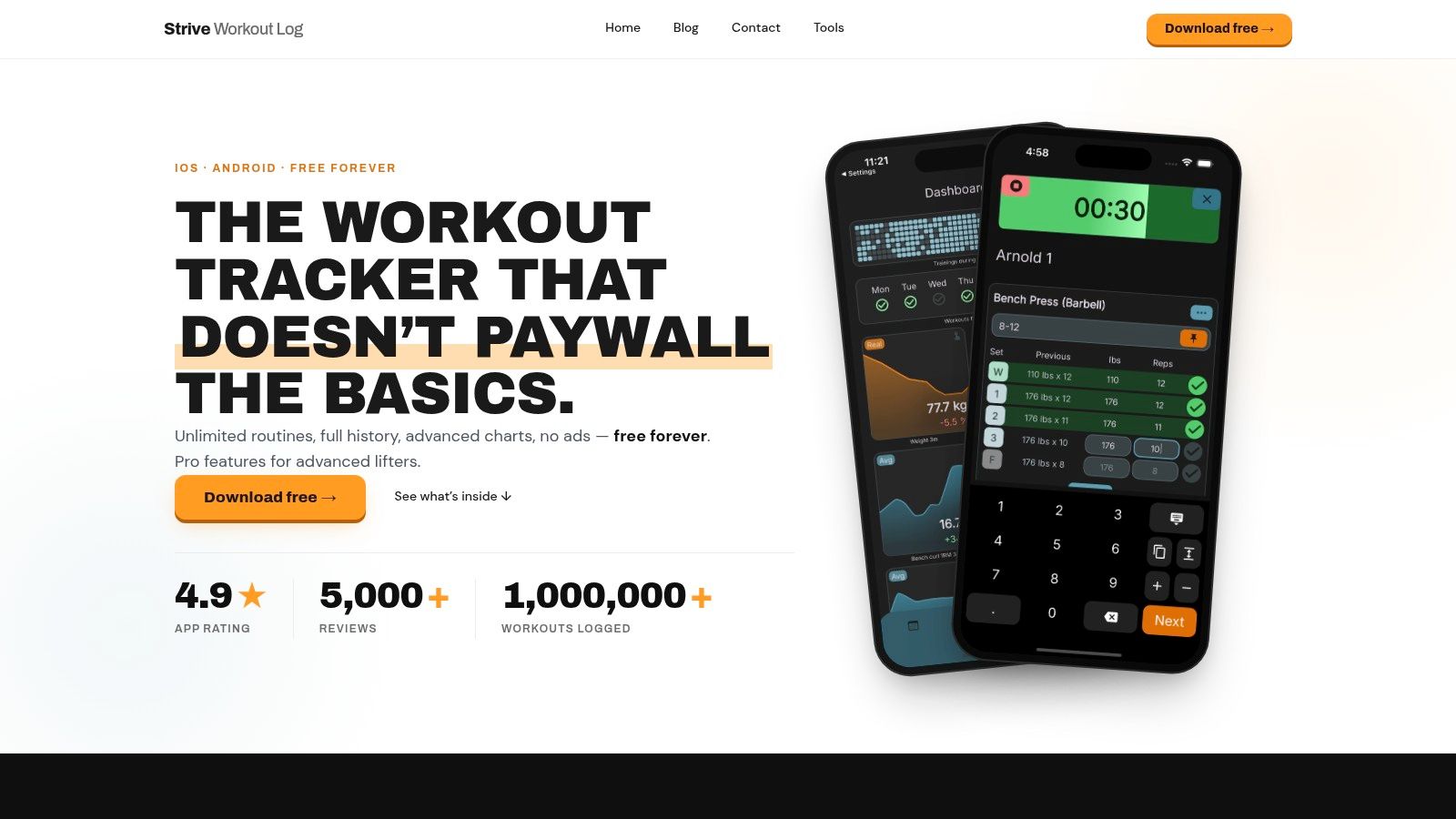
For a hypertrophy block in Strive Workout Log, I would build the plan first, assign routines to specific weekdays, and set the next-session targets by hand so the app always knows what has to improve. I would turn on the progression rule I want, then connect bodyweight and cardio sync through Apple or Google Health so I am not typing the same numbers twice. That is why the app's workout tracking template setup works. It keeps the structure visible without turning setup into a project.
The weekly workflow should stay plain. Open the app, check today's session, log warmups and working sets with RIR, and use the per-exercise rest timer so rest periods stay honest. If you care about hypertrophy, the dashboard should then show you whether volume, effort, and effective-rep trends are moving in the right direction. If those numbers are flat, the program needs work.
The point of a setup like that is control. You know what is due today, you know what changed since last time, and you know whether your log is showing real progress or just a pile of completed sessions.
The Pro tier's 30-day free plans trial gives beginners room to try structured planning without locking into a long commitment, and the local-data approach matters if you want a training history you can audit instead of handing it over to a cloud account. For a lifter who cares about repeatability, that is the whole point.
Putting It All Together and Auditing Your Choice
A good workout plan app should pass five tests. It should model a full plan → weeks → workouts → sets structure, support manual progression rules, log the fields needed for evidence-based analysis, protect your data, and keep friction low enough that you still train for 8 to 12 weeks straight.
That's the contrarian answer most reviews miss. The flashy app with the longest feature list is often the weakest choice for real lifting. Minimal trackers win when they make honest logging, progression, and trend review almost automatic.
Use this checklist before you commit:
- Structure first: can the app organize a real plan, not just a pile of sessions?
- Progression second: can you control overload, or does the software control you?
- Data quality: does it record the numbers that matter for hypertrophy and strength?
- Ownership: can you trust where your history lives and what happens to it?
- Friction: do you want to open it on a rough Tuesday?
If the answer is yes across those points, you're probably looking at a tool that will help you train. If the answer is no, keep moving.
If you want a no-nonsense tracker built around real progression instead of app-store theater, try Strive Workout Log. It's made for logging, planning, and tracking the lifts that drive hypertrophy, with the kind of structure that keeps training honest.
Leave a Reply